New EventNook Contact CRM
Contact CRM for event invitations
Invite the right people by email and WhatsApp, follow up with the guests who haven't registered yet, and give every guest a registration form that already knows them.
- Email and WhatsApp invitations
- Pre-filled registration link for every guest
- Follow up with "Not yet registered"
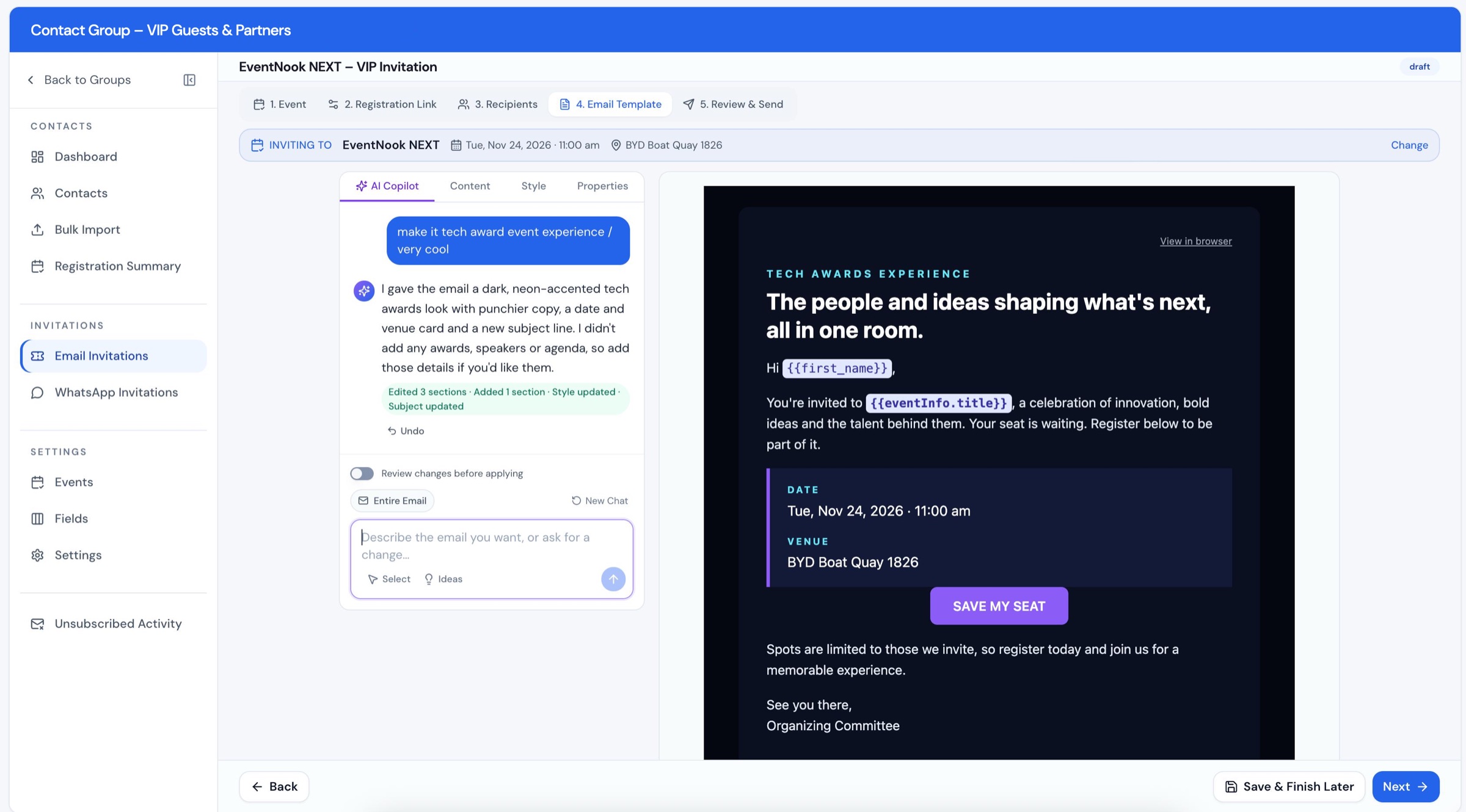
What is EventNook Contact CRM?
EventNook Contact CRM is the contact list and invitation tool for event organisers. Keep your guests in contact groups, send branded invitations by email or WhatsApp, and give every guest a unique registration link that opens the event's form with their details already filled in. When the first wave goes out, send the next one only to the people who are not yet registered. It works directly with your EventNook events, so you can see who registered, and whether they came from your invitation.
Target any group
Send to a whole contact group, a filtered list, or people you pick one by one.
Follow up the right guests
Duplicate an invitation and send it only to contacts who haven't registered yet.
Pre-filled registration
A unique link per guest opens the form with their details already in place.
Email and WhatsApp
Invite guests where they actually read messages, with reports for both.
How it works
From guest list to registrations in five steps
Every email and WhatsApp invitation follows the same guided steps. Save at any point and finish later.
- 1
Event
Pick the EventNook event you are inviting guests to.
- 2
Registration link
Choose the ticket type, link expiry, one registration per person, and which details to pre-fill.
- 3
Recipients
Everyone in the group, only those not yet registered, a filter, or hand-picked contacts.
- 4
Email template
Design the email with AI Copilot, merge fields and ready-made registration buttons.
- 5
Review and send
Check each part, send a test, then send now or schedule a date and time.
Contacts and groups
One clean guest list for every audience
Keep members, VIPs, partners and past attendees in their own contact groups, each with the fields it needs.
- Import from CSV or Excel. AI suggests how your columns map to contact fields, and you confirm before anything is imported.
- Smart Paste. Paste a list from an email or document and the contacts are pulled out for you.
- Fields that fit the group. Choose from a field library or add your own, with rules for formats such as Singapore NRIC/FIN and postcodes.
- Data that's ready to send. Phone numbers are standardised with country codes, likely email typos are flagged, and duplicate emails are flagged on import.
- Tags, categories and member types to organise contacts and choose who to invite.
Target and follow up
Invite the right people, then chase only the ones who haven't registered
Choose exactly who gets each invitation. For the follow-up, there is no spreadsheet matching: the CRM checks the event's registrations for you.
- Everyone in the contact group, in one send.
- Not yet registered. Contacts whose email address isn't on the event's registration list yet.
- Filter by name, email, company, category, member type or tags.
- Choose people one by one, and leave some people out of any send.
Duplicate keeps every setting from the first invitation, including the event, so a reminder takes a few clicks.
Unique registration links
A registration form that already knows your guest
Every guest gets their own registration link for each invitation. It opens your EventNook registration form with the details you already hold filled in, so registering is a quick confirm rather than a form to fill.
- Pre-fill name, email, mobile, company, job title and more. Use Match Automatically to pair contact fields with form fields.
- Lock what shouldn't change. Mark any pre-filled field as read-only.
- Control the link. Set the ticket type, an expiry date, and whether each guest can register once or more.
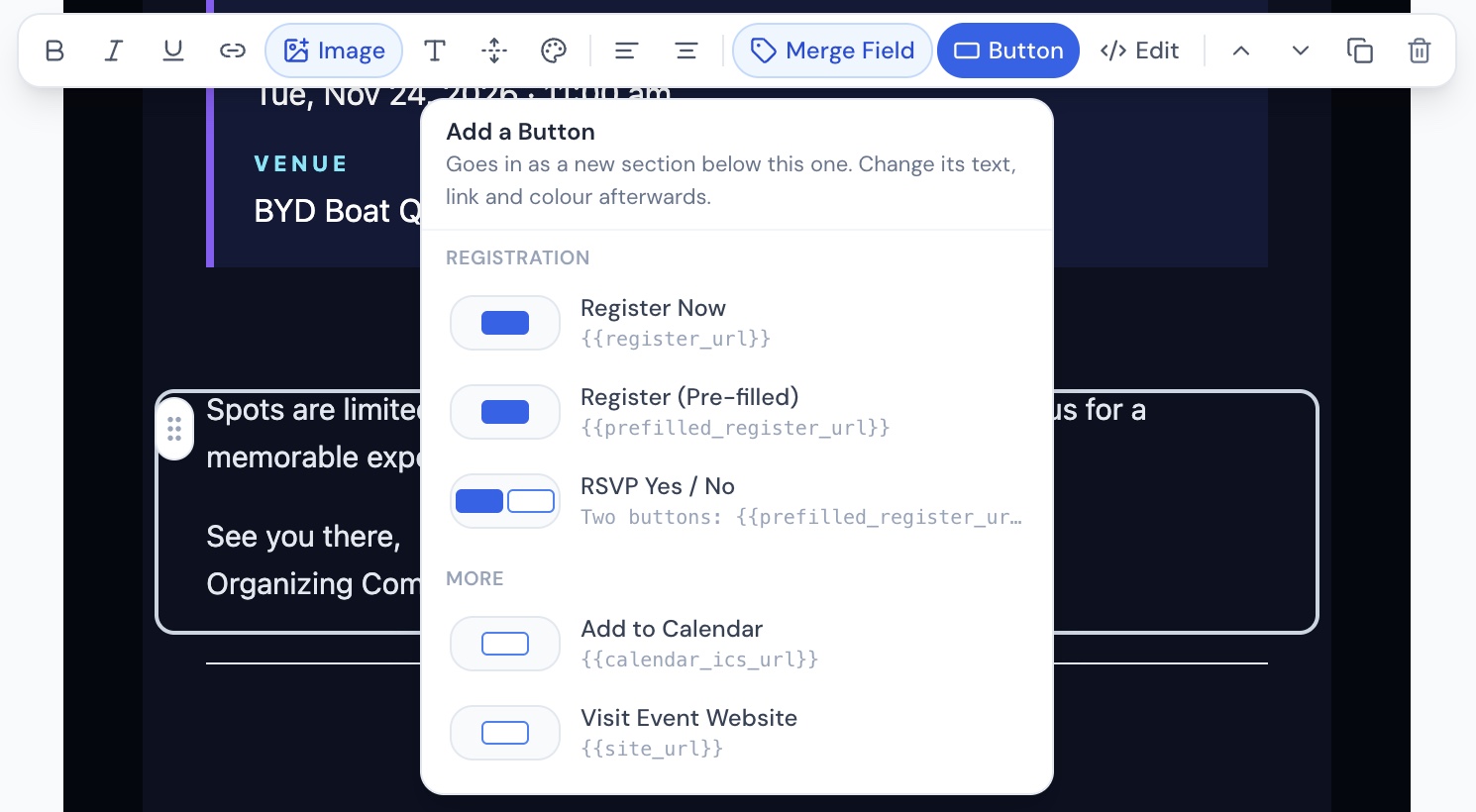
- RSVP Yes or No. "Yes, I'll Attend" opens the pre-filled form; "No, I Can't Make It" records the reply against a Not Attending ticket you choose.
- Know where registrations came from. Registrations through the link are credited to the invitation.
Made for private and invitation-only events
Galas, VIP dinners, member events and executive briefings run on a known guest list. Personal links, read-only details and one registration per guest keep the experience tidy and personal. Pair them with your EventNook event's own access settings to keep registration invitation-only.
AI Copilot email builder
Describe the email. AI Copilot builds it.
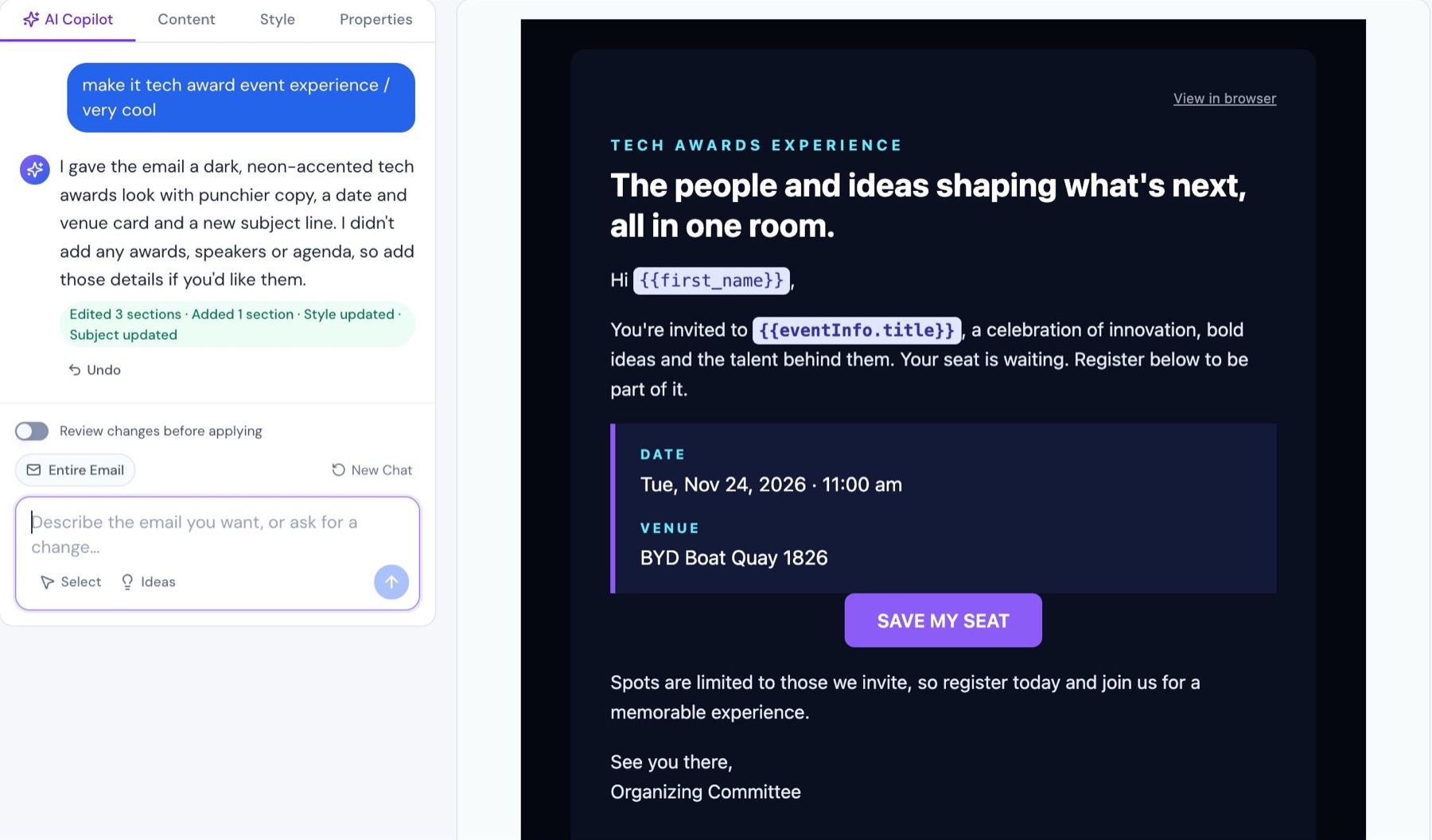
Ask for "a tech awards look" or "make it read well on a phone", and AI Copilot changes the sections, style and subject line. You stay in charge of every change.
Quick starts
Create a complete invitation, fix Outlook display issues, improve the subject line, or tidy spelling and grammar.
Review before applying
Apply changes instantly with Undo, or compare each change first and apply or discard it.
Built for invitations
Merge fields, registration and RSVP buttons, Add to Calendar, preview with real event data, and test sends.
WhatsApp invitations
Invite guests on WhatsApp, with the same personal link
For audiences who read WhatsApp before email, send the invitation there. It follows the same five steps as email.
- Approved message templates, personalised with each contact's name and details.
- Add the event title, date and the guest's pre-filled registration link, plus a Not Attending link.
- Sent to the mobile or WhatsApp number on each contact. Missing or invalid numbers are skipped and logged.
- See what happened: sent, delivered, read and failed, plus guests' replies.
Reports
See who registered, and which invitation brought them
The Registration Summary puts your contact group next to the event's registrations, so you always know who still needs a nudge.
- Registered and not registered for every contact in the group.
- From invite or direct. Registrations through a pre-filled link show the invitation that brought them.
- Email results: delivered, opened, clicked, bounced and unsubscribed, guest by guest.
- Export to CSV whenever you need to share the numbers.
Who it's for
Built for events where the guest list matters
Private and invitation-only events
Galas, VIP dinners and executive roundtables with a known guest list.
Corporate and client events
Customer days, launches and appreciation nights for your accounts.
Associations and members
Member events by member type, category or tag.
Conferences and roadshows
Invite past attendees and partners, then follow up before the deadline.
Secure sign-in and exports. Optional two-factor sign-in and audited contact exports, from an ISO 27001 certified company.
Unsubscribes respected. The unsubscribe link is checked before sending, and contacts who unsubscribe are left out of later emails to that group.
Checks before every send. A review checklist catches missing links and unknown merge fields, and senders confirm PDPA/GDPR responsibilities.
FAQ
Contact CRM questions
What is EventNook Contact CRM?
EventNook Contact CRM is the contact list and invitation tool for event organisers. You keep guests in contact groups, send email or WhatsApp invitations for your EventNook events, give each guest a unique pre-filled registration link, and follow up with the contacts who haven't registered yet.
Can I send a reminder only to people who haven't registered?
Yes. In the Recipients step, choose Not yet registered. Contact CRM compares the group's contacts with the event's registrations by email address and sends only to those not on the list yet. For a follow-up, duplicate the first invitation, which keeps every setting, and send it to Not yet registered.
What is a pre-filled registration link?
It is a registration link unique to one guest and one invitation. It opens the event's EventNook registration form with the details you already hold, such as name, email, mobile, company and job title, filled in. You can mark fields as read-only, and registrations made through the link are credited to the invitation in the Registration Summary.
Is Contact CRM suitable for private and invitation-only events?
Yes. Each guest receives a personal link, details can be locked as read-only, and you can limit each guest to one registration and set an expiry date for the link. Use your EventNook event's own access settings to keep registration invitation-only.
Can I send event invitations on WhatsApp?
Yes. WhatsApp invitations use approved message templates, personalised with each contact's details, and can include the event title and date, the guest's pre-filled registration link and a Not Attending link. Reports show messages sent, delivered, read and failed, along with guests' replies.
How do RSVP Yes and No buttons work?
Yes, I'll Attend opens the guest's pre-filled registration form. No, I Can't Make It records the reply against a Not Attending ticket type that you choose in the Registration Link step.
How do I add contacts?
Import a CSV or Excel file and AI suggests how your columns map to contact fields, or use Smart Paste to pull contacts out of pasted text. You can also add contacts one at a time. Each contact group has its own fields, and phone numbers and emails are checked as they come in.
Does AI write the invitation email?
AI Copilot can create a complete invitation from a short description and edit sections, styles and the subject line on request. You can apply changes with Undo or review each change before applying it, and a review checklist runs before anything is sent.
What can I track after sending?
Email reports show delivered, opened, clicked, bounced and unsubscribed for each guest. The Registration Summary shows which contacts registered, whether they came from an invitation or registered directly, and can be exported to CSV.
How are unsubscribes handled?
Contacts who unsubscribe from an email are removed from later email sends to that contact group, and you can see them in Unsubscribed Activity. Before sending, the review checks that the unsubscribe link is still in the email.
Fill the room with the right guests
See Contact CRM with your own guest list and event. We'll walk you through invitations, pre-filled links and follow-ups.